You can change the application language at any time by clicking on the current language flag icon at the top right of the screen.
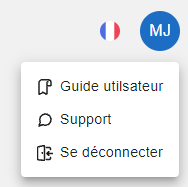
A menu of actions is displayed when you click on the avatar icon (the letters contained in the avatar icon correspond to the first letter of the user’s first name and last name):
- Access to the user guide (redirection to the documentation),
- Access to support for any anomalies or questions (opening a modal window)
documentation: https://doc.bim.fm/index.php/2021/10/11/support , - Log out of the platform