To prevent multiple users from changing the same file at the same time, user must check out or lock a file before updating it. (The checkout and checkin operations are equivalent to lock and unlock, respectively)
Checking out a file grants exclusive update rights to the user who has the item checked out. When users check out a file, they hold a persistent write-lock on that file.
We have 3 lock types:
- Persistent lock
A persistent-lock is persistent and tied to a username, not a connected session. A persistent-lock remains in effect until either user with the SuperCheckIn privilege unlocks your item. Furthermore, the same user is allowed to make changes in any authenticated session. If you connect using the same user name to multiple connections, each connection has permission to update the write-lock.
- Transient lock
A Transient lock is volatil (expire after 30minutes unless refreshed – See RefreshLock), a transient lock like a persistent lock, prevents anyone that does not have a valid lock ID from making changes to a file.
- And read only lock
Read only is a special lock to prevent anyone from making change to a file.
Please find bellow the possible actions depending of the lock type:
| Action | Lock: Persistent or Transient | Readonly |
| Upload a new version | Yes if owner | No |
| Rename file | No | No |
| Move file | Yes | Yes |
| Delete file | No | No |
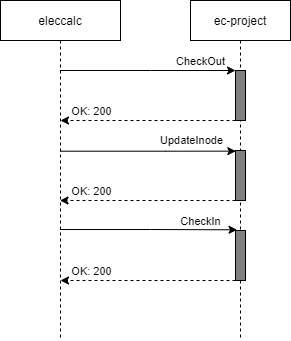
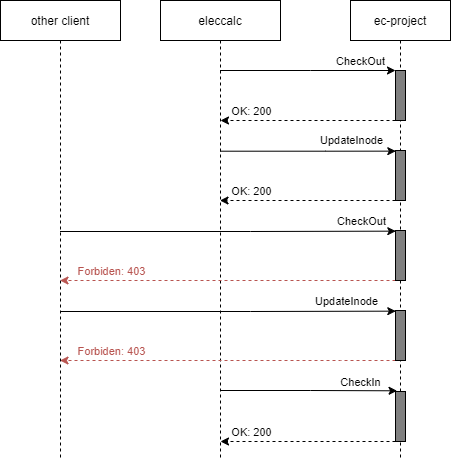
CheckOut
The Lock operation locks a file for editing by client application instance that requested the lock. When locked, a file should not be writable by other applications.
Parameters
- projectId (string) A string that represent the unique identifier for the project, using 32 hexadecimal characters.
- inodeId (string) A string that represent the unique file identifier, using 32 hexadecimal characters.
Response
If the file is currently unlocked, the server should lock the file and return an HTTP status code 200 OK.
If the file is currently locked, the server return an HTTP status 401 Unauthorized with an error code 22.
In all other cases, the server must return a “lock conflict” response (500).
CheckIn
The Unlock operation releases the lock on a file.
Clients will usually make a Lock request to lock a file prior to calling this operation. The client will pass the Inode ID previously locked in the lock request.
Parameters
- projectId (string) A string that represent the unique identifier for the project, using 32 hexadecimal characters.
- inodeId (string) A string that represent the unique file identifier, using 32 hexadecimal characters.
Response
If the file is currently lock by the request user, the server should unlock the file and return an HTTP status code 200.
If the file is lock by another user, the server return an HTTP status 401 Un authorized with an error code 22.
In all other case, the server must return a “lock conflict” response (HTTP status 500).
StealLock
The steal-lock operation force a file to be unlock and relock it for the current logged on user. This operation can be request only on a PERSISTENT lock.
Parameters
- projectId (string) A string that represent the unique identifier for the project, using 32 hexadecimal characters.
- inodeId (string) A string that represent the unique file identifier, using 32 hexadecimal characters.
Response
C# API example
// Login to the server
BimfmApi bimfmapi = new BimfmApi();
bimfmapi.mHttpRqs.BimFmUrl = "https://dev.edifycad.com/api";
Tokens myToken = bimfmapi.token(
    new Login() {
        username = id,
        password = password,
        grant_type = "password"
    }).Result;

...

// Lock a file
try
{
    ResponseApi<ProjectInodeLockDto> lock = bimfmapi.project.Checkout(projectId, inodeId);
    if (folders.Status != 200)
    {
         switch (folders.ErrorCode)
         {
              case ERROR_CODE.FILE_ALREADY_LOCK:
                   logger.Error("File already lock by another user.");
                   break;
              case ERROR_CODE.LOCK_CONFLICT:
                   logger.Error("File can be lock.");

                   break;
              default:
                    logger.Error("Un-managed exception.");
              }
          }

     }
}
catch (Exception ex)
{
     ...
}


...

// Upload a new version
bimfmapi.project.UploadNewVersionRequest("myfile.qsp", filecontent, projectId, folderId, inodeId);

...

// Unlock file
try
{
    ResponseApi<ProjectInodeLockDto> lock = bimfmapi.project.Checkin(projectId, inodeId);
    if (folders.Status != 200)
    {
         switch (folders.ErrorCode)
         {
              case ERROR_CODE.FILE_NOT_LOCK:
                   logger.Error("File not lock. Please checkout file before checkin.");
                   break;
              case ERROR_CODE.LOCK_CONFLICT:
                   logger.Error("File can be lock.");
                   break;
              default:
                    logger.Error("Un-managed exception.");
              }
          }

     }
}
catch (Exception ex)
{
     ...
}